CXT concept study · not real research

Designing a toy shop that's quick for grown-ups and fun for kids.

Pomplo is a made-up toy brand. We used it to show how CXT Dev approaches a UI/UX and motion project for ecommerce: the problem, who it's for, the journeys, the structure, the system and the decisions we made along the way.

Scope
UX, UI, motion, 3D, front-end
Tools
Figma for design, Blender for the toys, Next.js build. Components map to Framer and Webflow.
Status
Concept. Personas are assumptions, not research findings.

01 · Problem

Two audiences, one screen.

The grown-up

Parents and gift-givers want the right toy, fast. They know an age and a budget, usually on a phone, often with a child pulling at their sleeve. Every extra tap, vague category or slow page is a reason to give up.

The kid

Children are often looking at the screen too, and they want delight: bright colour, toys that move, a reason to point. A shop that feels like a spreadsheet loses them, and with them some of the excitement that sells the toy.

Design goals we set

  1. Right toy, fast. Age first, three clear filters, and a guided route for people who don't know what to buy.
  2. Delight that never waits. Motion on feedback and hover, never in front of a price or a button.
  3. Trust at a glance. Age guidance, what's in the box and returns are visible without hunting.

02 · Proto-personas

Who we're designing for.

Proto-personas are our starting assumptions. In a real project we'd validate them with interviews and analytics before committing.

Ada

Parent of a 4-year-old

Shops in short bursts on her phone, between nursery pick-up and dinner. Knows exactly what her son is into this week (space).

Wants

  • Something he'll actually play with
  • Confident it's right for his age
  • Delivered before the weekend

Gets stuck on

  • Categories that don't match how kids play
  • Product pages that bury what's in the box
  • Being bounced to a basket page every time she adds something

Graham

Grandparent buying a birthday present

Sees his granddaughter (turning 2) once a month. Happy to spend, nervous about getting it wrong. Uses a tablet, reads every word.

Wants

  • A safe, sensible pick for a 2-year-old
  • Gift wrap and a note
  • Easy for the parents to swap if needed

Gets stuck on

  • Too much choice and jargon
  • Not knowing what's suitable for the age
  • Small text and fiddly buttons

03 · Key journeys

Two routes to the right toy.

Ada buys for a 4-year-old

  1. 1Lands on homeTaps 'Ages 3–5' on the first screen
  2. 2Shop, pre-filteredAdds 'Pretend play'; five toys left
  3. 3Product pageSees the age badge, what's in the box and the 3D view
  4. 4Add to basketSticker burst, drawer shows £8 to free delivery
  5. 5Adds a Whirl TopFree delivery unlocked; checks out

Graham uses the Gift finder

  1. 1Home panel'Not sure what to get? Four taps.'
  2. 2AgeTaps 'Toddler 1–3'; it moves on by itself
  3. 3Interests & budgetSkips interests, picks £20–£35
  4. 4OccasionBirthday, so gift wrap switches on
  5. 5ResultsThree toys, each with a reason; adds Dot the Duck

04 · Sitemap

Small, flat and easy to get back from.

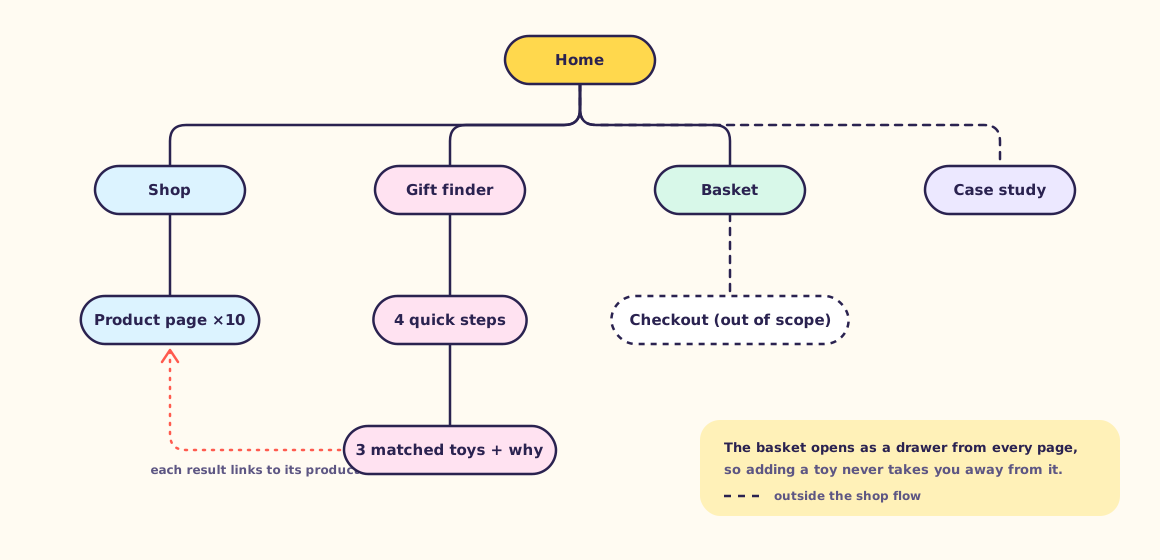
Every page is at most two taps from home, and the basket is reachable from everywhere as a drawer.

Sitemap: Home links to Shop, Gift finder, Basket and this case study. Shop leads to ten product pages. Gift finder has four quick steps (age, interests, budget, occasion) leading to three results, which link to product pages. Product pages add to the basket. Checkout is out of scope.

05 · Lo-fi wireframes

Mobile first, on paper first.

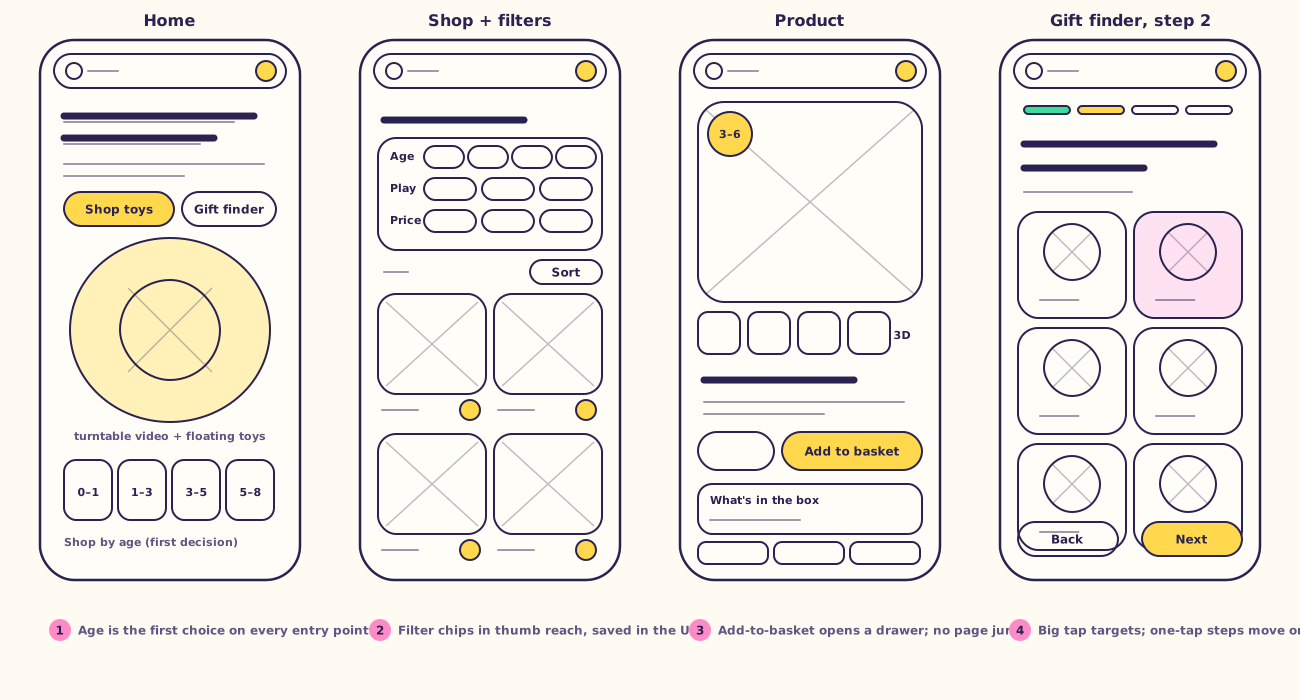
Sketched at phone size before any colour, to get the order of decisions right: age, then play, then price.

Four lo-fi phone wireframes: home with age cards, shop with chip filters and a two-column grid, product page with gallery, age badge and add-to-basket, and Gift finder step two with large tiles and back/next buttons.

06 · Design system

Bright, flat and built from a few pieces.

Colour

No dark sections and no drop shadows. Text is always Ink on a light colour, so every pairing passes WCAG AA.

Sunshine#FFD84DPrimary actions, age badges, the hero
Sky#4CC3FFPretend play, 3D, calm panels
Mint#3DDC97Success, progress, puzzles
Bubblegum#FF8AC8Cuddles, gift moments, stickers
Grape#8E7CFFScience & tinkering, focus rings
Tangerine#FF9A3COn the move
Tomato#FF5A4EAccents only, never text
AaInk#2A2250Text and outlines only
Cream#FFFBF2Page background

Type

Display · Bricolage Grotesque 800

Little days, feel big.

Headlines 46–104px, tracking −4.5%, line height 0.96
Body · Figtree 400–800

Bright, built-to-last toys for ages 0 to 8. Pick an age, or let the Gift finder choose for you.

16–20px, line height 1.55; labels 13px caps at +8%

Components

Buttons
Shop all toys Gift finderKeep shopping
Filter chips
PuzzlesUnder £20
Age badge & stepper
Ages3–6Ages1–42
Toast & delivery bar
Added Pip Rocket to your basket
£8 away from free delivery
Product card (hover it)
Ages4+

Whirl Top

A big, bright spinning top that hums

£12

Motion principles

  1. Feedback first. Movement answers something you did: a hover, a tap, an add.
  2. Under 400ms on the buying path. Longer, decorative moves happen on toys, never in front of buttons.
  3. Never block input. Nothing waits for an animation to finish before you can tap again.
  4. Each toy moves like itself. Rockets lift, tops spin, bears squish, ducks waddle.
  5. Reduced motion is a real mode. With prefers-reduced-motion on, all of it stops and the shop still works the same.
PatternDurationEasingNotes
Hover bounce160mscubic-bezier(.34,1.56,.64,1)Buttons, chips, thumbnails. Overshoot gives the squish.
Toy wobble / spin550–900msease-out, plays onceEach toy has its own move: the rocket lifts, the top spins, the bear squishes. Decorative, never blocks a click.
Add to basket≈750ms burst, drawer at 260msspring 420 / 38Sticker burst from the button, then the drawer slides in. You can keep tapping while it plays.
Drawer / sheet≈320msspring, no bounce-backRight-hand drawer on desktop, bottom sheet on phones.
Page transition260mscubic-bezier(.2,.8,.2,1)Fade and 14px rise on route change. Skipped on first load so the page paints straight away.
Gift finder steps≈300msspring 520 / 38Slide in the direction of travel; single-choice steps advance 220ms after the tap.
Scroll herotied to scrolllinear mappingFloating toys drift and the stage tilts as you scroll. No pinning, no scroll-jacking.

07 · Before & after

Decisions we made, and why.

The 'before' column is the usual pattern we started from in early sketches, not a real competitor.

Before

Age was one filter among twelve, in a sidebar.

After

Age is the first question everywhere: home cards, the top filter row, a badge on every card and product.

Every grown-up we design for knows the child's age. Most don't know the category name.

Before

Add to basket sent you to the basket page.

After

A drawer opens over the page, with a free-delivery bar. 'Keep shopping' is one tap.

Stay in flow; parents tend to add two or three things in a session.

Before

A long gift quiz with sliders.

After

Four big-tile steps, one skippable, with three results and a plain reason for each.

Grandparents want confidence, not a catalogue. 'Right for toddlers · in your budget' is the confidence.

Before

An auto-playing hero carousel.

After

One scene: a 3D turntable, with the shop and Gift finder buttons visible straight away.

Carousels hide the call to action and cost load time. The delight can sit next to the CTA instead.

Before

'Develops cognitive skills.'

After

'Skills it builds' as three short, concrete notes, like 'Countdowns, missions and moon picnics'.

Specific beats clinical. It tells a parent what play actually looks like.

Before

Animation on everything, including the buy button.

After

Motion lives on hover, feedback and transitions. Prices, filters and checkout stay still and instant.

Delight shouldn't slow down shopping. Reduced-motion users get the same shop with no movement.

08 · Next steps

What we'd test with real people.

Validate

  • 5–6 moderated mobile sessions per persona, including grandparents on tablets
  • A tree test of the play-type names
  • Gift finder: do people trust the three results enough to buy?
  • Does motion help or distract? A/B the burst and drawer against a plain toast

Hand off

  • Figma library: tokens, components and the frames shown here
  • Framer or Webflow build: each component maps to a CMS-driven symbol
  • Motion spec: the timing table above, exported as variables
  • 3D: Blender source files and web-ready GLBs for each toy

Want this kind of thinking on your shop?

CXT Dev is the web arm of CXT Studios, a motion design studio. We design, animate and build.